

Employment Agreements in DraftPro
Draft, revise, and redline employment-related agreements in Microsoft Word
DraftPro helps legal teams work on employment-related agreements directly in Microsoft Word. Legal teams can apply playbooks, use approved clause language, evaluate suggested edits, and apply surgical redlines while staying in the drafting workflow they already use.
DraftPro supports employment agreement drafting workflows for Employment Agreements, Contractor Agreements, Consulting Services Agreements, Advisory Agreements, and Separation Agreements. It is designed for legal teams that need to prepare, revise, and negotiate employment-related contracts with more consistency and control.
How does DraftPro support employment agreement drafting?
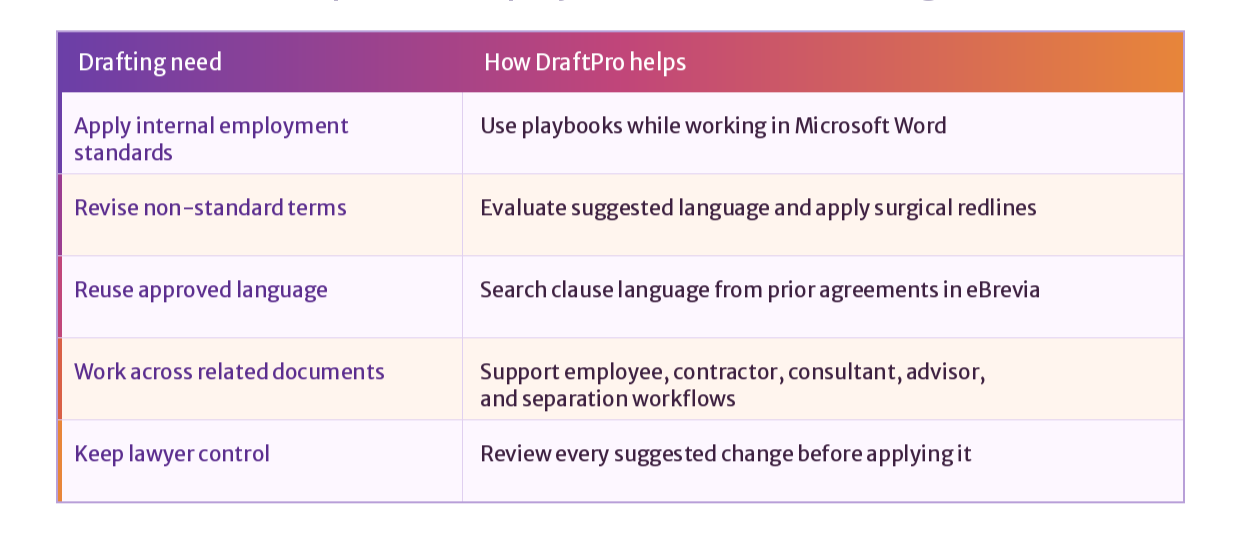
DraftPro supports employment agreement drafting by helping legal teams revise employee, contractor, consultant, advisor, and separation agreements in Microsoft Word. Users can apply employment playbooks, compare draft language against internal standards, use approved clauses from prior agreements, and apply redlined edits while keeping lawyers in control of every change.
This makes DraftPro useful for both company templates and third-party drafts. Legal teams can work from the document in front of them, identify language that needs attention, and make targeted edits without moving the agreement into another system.
Employment agreement types DraftPro supports
DraftPro can support drafting and revision workflows for common employment-related documents, including Employment Agreements, Contractor Agreements, Consulting Services Agreements, Advisory Agreements, and Separation Agreements.
Each of these documents can involve different drafting needs. A full-time employment agreement may focus on role terms, compensation, confidentiality, IP assignment, restrictive covenants, and termination. A contractor or consulting services agreement may require closer attention to scope of services, work product ownership, independent contractor language, payment terms, and termination rights. An advisor agreement may involve compensation, equity-related terms, conflicts, confidentiality, and IP ownership. A separation agreement may require careful language around releases, continuing obligations, non-disparagement, return of property, and survival.
DraftPro helps legal teams bring these related workflows into a more consistent drafting process.
Also explore how DraftPro helps draft, revise, and redline other agreement types directly in Microsoft Word -
Apply employment playbooks while you work on the draft
Employment agreement drafting is not only about writing polished language. Legal teams need to know which provisions should be included, which terms need to be changed, and which edits should reflect the organization’s preferred position.
DraftPro lets legal teams apply playbooks inside Microsoft Word while they work on the agreement. The system can help identify the document type and surface relevant playbooks, so reviewers can work from the right standards for the document.
For employment-related agreements, teams can use playbooks to guide drafting decisions around confidentiality, IP ownership, work product, non-compete or non-solicit provisions, outside activities, termination rights, survival language, notice requirements, release language, and return of company materials.
Turn playbook guidance into redlined contract edits
DraftPro helps legal teams move from guidance to contract language. When draft language does not align with the selected playbook, DraftPro can suggest revised language for the lawyer to evaluate.
The reviewer decides what to do next. Suggested language can be accepted, ignored, or handled manually. When a suggested change is accepted, DraftPro applies it in Microsoft Word as a surgical redline, so the edit remains visible for internal review, negotiation, or counterparty response.
This is especially useful for employment-related agreements where changes are often precise. A lawyer may need to clarify contractor status, revise IP assignment language, add survival language, adjust termination rights, or update return of property obligations. DraftPro helps make those edits directly in the draft.
Use approved clause language for employment terms
Employment agreement drafting often depends on language the legal team already trusts. DraftPro can help users find relevant clause language from agreements stored in eBrevia, instead of searching through old folders, email threads, or prior drafts.
Legal teams can use approved clause language to support drafting, clause replacement, or clause insertion. This can help with provisions such as confidentiality, IP assignment, work product ownership, non-solicit language, termination, release language, survival, and consulting services terms.
DraftPro helps legal teams reuse language with context. Users can search by contract type, matter, project, jurisdiction, or specific wording, then use the relevant language while working in Microsoft Word.
How DraftPro helps with
employment-related drafting?

Support employee, contractor, consultant, advisor, and separation workflows
Employment-related agreements often sit across different parts of the business. Legal still needs a consistent way to draft, revise, and finalize these documents.
DraftPro helps legal teams support these workflows without treating every document as the same. Teams can use available sample playbooks or create custom playbooks that reflect their own standards, fallback positions, and preferred language.
-
DraftPro can help teams work through scope, payment, confidentiality, work product, IP assignment, independent contractor status, and termination.
-
DraftPro can help with scope of services, compensation, equity-related terms, conflicts, confidentiality, IP ownership, and post-engagement obligations.
-
DraftPro can help legal teams work through release language, confidentiality, non-disparagement, return of property, survival terms, and continuing obligations.
Stay in Microsoft Word from draft to redline
DraftPro is built for the contract drafting environment lawyers already use. Users can open an agreement in Microsoft Word, run the relevant playbook, navigate to language in the document, evaluate suggested changes, and apply surgical redlines without switching tools.
That matters for employment-related drafting because the work often involves careful, targeted edits. Lawyers need to preserve the Word document, keep track changes visible, and prepare a clean draft for internal approval or counterparty review.
DraftPro keeps the workflow familiar while adding playbook guidance, AI-assisted drafting support, and access to trusted clause language inside Word.

DraftPro helps legal teams draft, revise, and redline employment-related agreements directly in Microsoft Word. With playbooks, suggested edits, and trusted clause language, lawyers can work faster while staying in control of every change.
Draft employment agreements with
more control and consistency
-
DraftPro helps legal teams draft, revise, and redline employment-related agreements in Microsoft Word. Teams can apply playbooks, evaluate suggested language, and use trusted clause language from eBrevia while working on the agreement.
-
DraftPro can support workflows for Employment Agreements, Contractor Agreements, Consulting Services Agreements, Advisory Agreements, and Separation Agreements.
-
Yes. DraftPro can help legal teams work on contractor agreements by applying playbook guidance and supporting edits around scope of services, payment, confidentiality, work product ownership, independent contractor status, IP assignment, and termination.
-
Yes. DraftPro can support consulting services agreement drafting workflows, including provisions related to services, deliverables, payment, confidentiality, IP ownership, work product, and termination.
-
Yes. DraftPro can support advisor agreement workflows, including terms related to services, compensation, equity-related provisions, conflicts, confidentiality, IP ownership, and post-engagement obligations.
-
Yes. DraftPro can support separation agreement workflows where legal teams need to work through release language, confidentiality, non-disparagement, return of company property, survival terms, and continuing obligations.
-
DraftPro includes sample playbooks for selected common agreement types, including employment agreements. Legal teams can also create, edit, duplicate, and publish their own playbooks for use within their organization.
-
Yes. DraftPro works as a Microsoft Word add-in, so legal teams can work on agreements, evaluate playbook guidance, and apply redlined edits inside Word.
-
Yes. When a provision does not align with the selected playbook, DraftPro can suggest revised language. The reviewer decides whether to apply the change, ignore it, or make a manual edit.
-
No. DraftPro supports the drafting workflow, but lawyers remain in control of what to accept, revise, or reject.