
Know Everything in Your Contracts. Act on What Matters.
Centralize your contract portfolio, surface critical business information and manage the work that follows, without traditional CLM friction.
Act on Every Contract.
Get started in as little as 7 days.
Put Your Contract Portfolio to Work
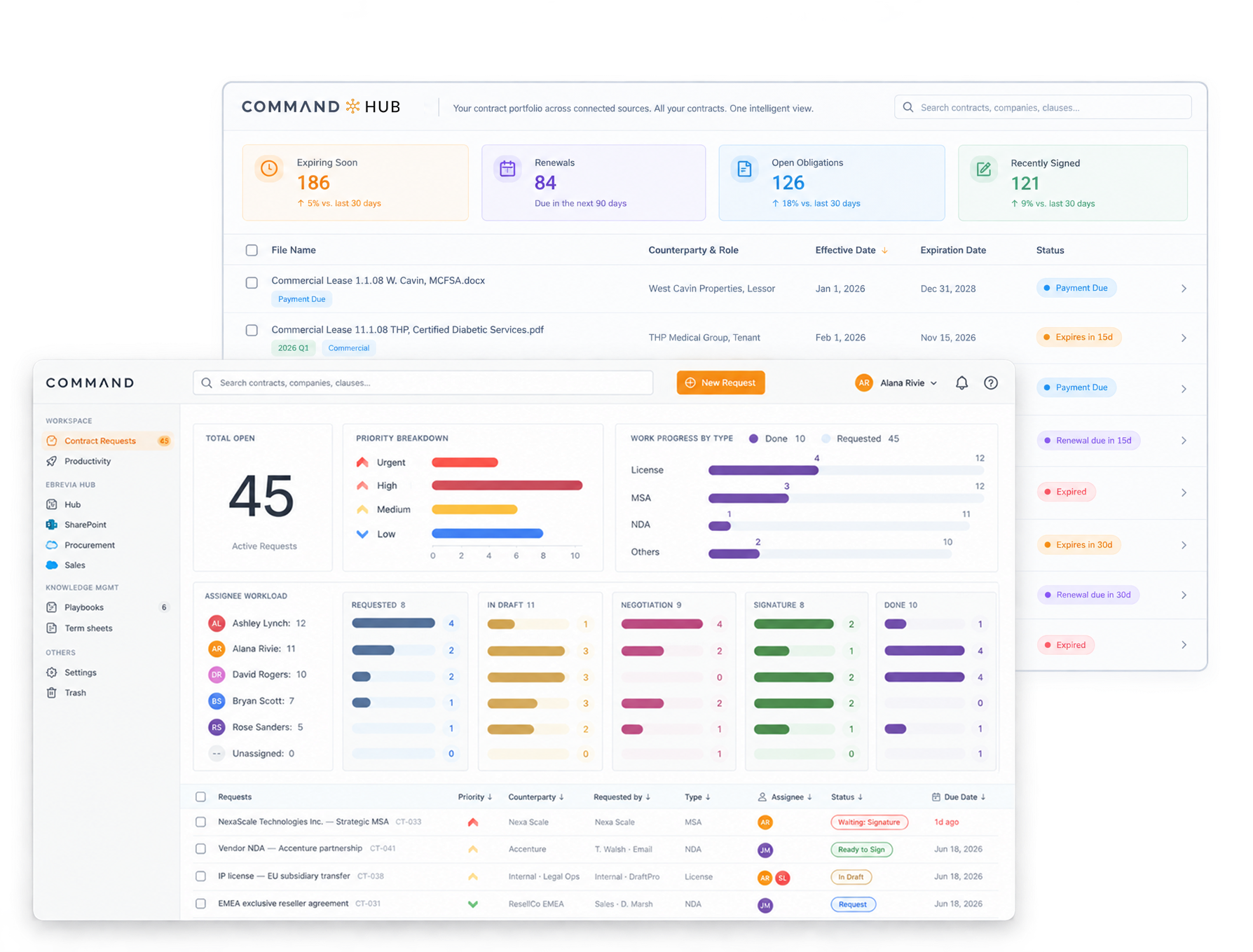
Command brings contracts, business information and active contract work together in one place.
See your whole portfolio.
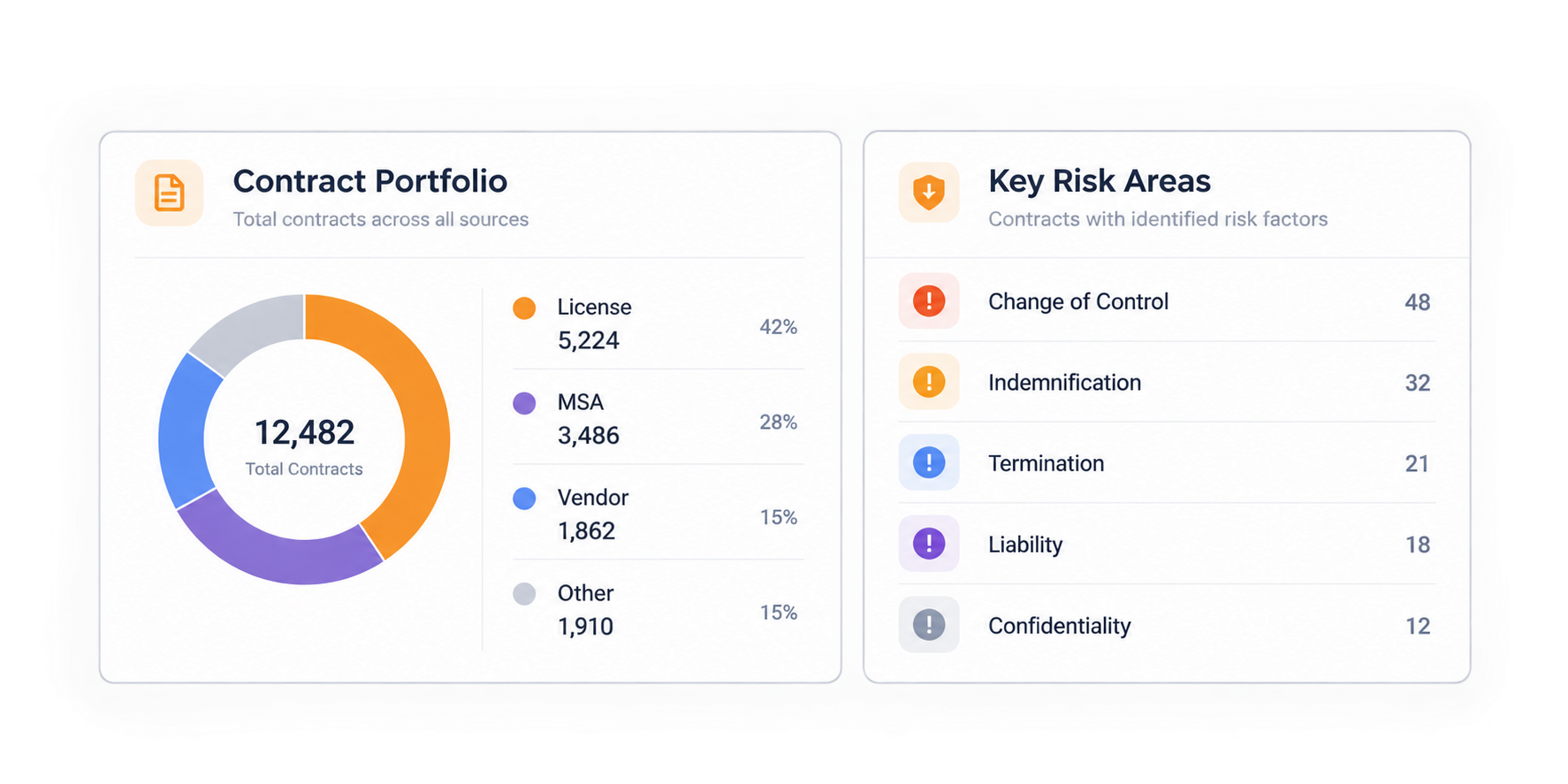
Bring your contract portfolio into eBrevia Hub, an intelligent repository within Command. Centralize agreements and find contract information across the portfolio.

Understand what’s inside.
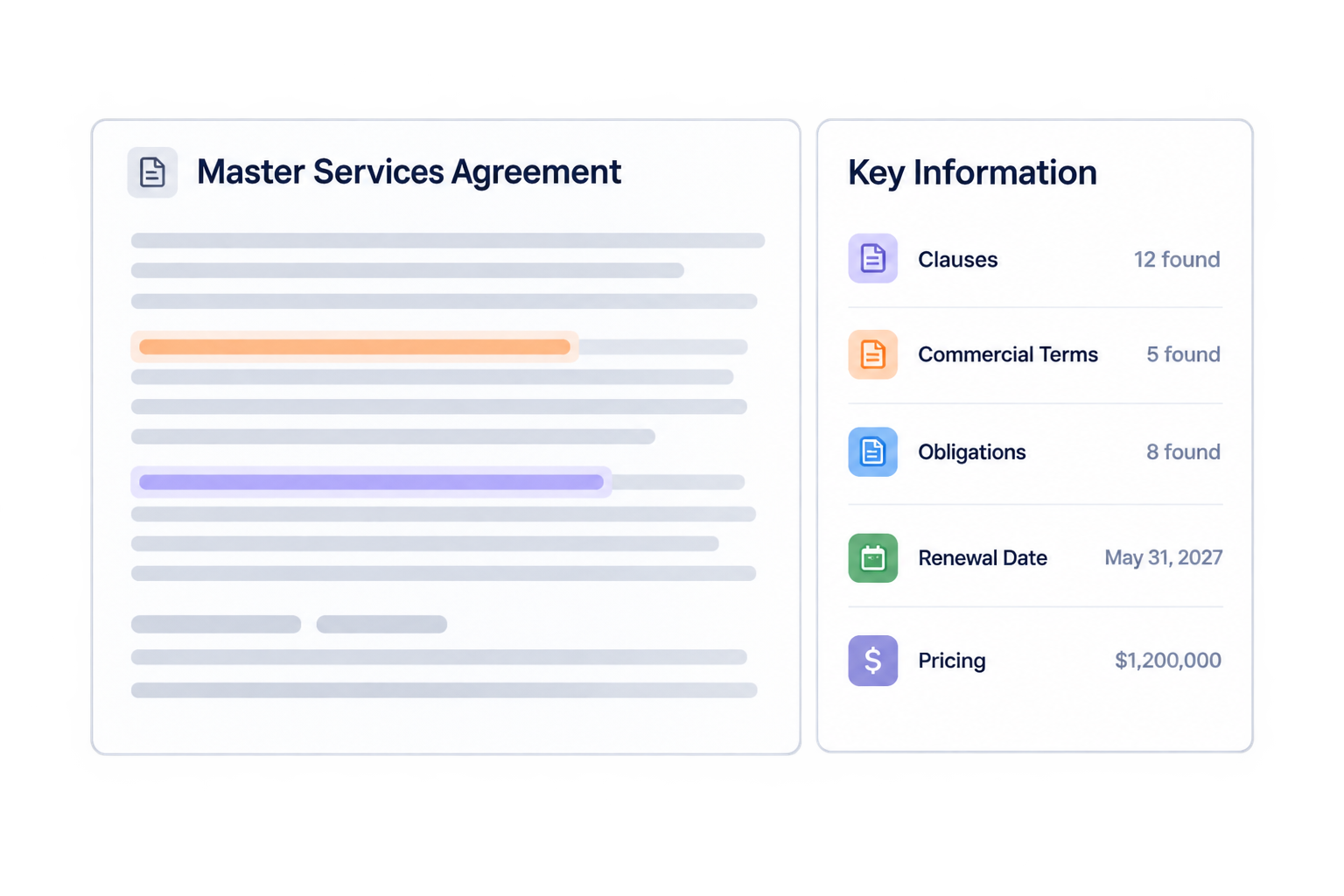
Use AI to extract and analyze clauses, commercial terms, obligations, risks, renewal dates, pricing, rights and other business information across hundreds or thousands of agreements.
Act on what matters.
Identify what requires attention, manage the work that follows and give teams the information they need to make decisions. Command works across the portfolio while helping teams act on the individual contracts that matter.
Your Command Center: eBrevia Hub
At the center of Command is eBrevia Hub, an intelligent repository that goes well beyond agreement storage.
Hub centralizes your contract portfolio and makes all information inside it accessible at scale. Teams can search agreements, extract contract data, analyze terms, summarize information and monitor what matters.
Instead of opening contracts one at a time, users can work with structured information across hundreds or thousands of agreements.

Surface and Sort Information Buried Across Your Contracts
eBrevia’s AI extracts and structures the information teams need from their agreements.

- ClausesLocate important provisions across agreements.
- Commercial termsHighlight key business terms.
- ObligationsFlag commitments that require action.
- Renewal datesStay ahead of upcoming renewals.
- PricingFind pricing and other financial terms.
- RightsUnderstand the parameters of each agreement.
- RisksIdentify terms that require review.
- Other contract dataExtract whatever information your organization needs.
Teams can search, compare and use this information across the portfolio instead of reviewing each agreement separately.


Manage Contract Work From Request to Signature
Command provides a structured way to manage active contract work.
- Organize requests
- Capture the contract type, counterparty, requester, assignee, priority, due date and drafting instructions in one place.
- See where work stands
- Track each agreement as it moves through drafting, review, negotiation and signature.
- Clarify ownership
- See who owns each contract and what needs to happen next.
- Maintain a record of activity
- Track status changes and other updates as work moves forward.
One Connected Approach to Contract Work
Command brings eBrevia’s contract management and established AI capabilities together, helping teams work with contracts before and after signature.
eBrevia Hub
Centralize contracts and access portfolio-wide intelligence within Command.
How Hub works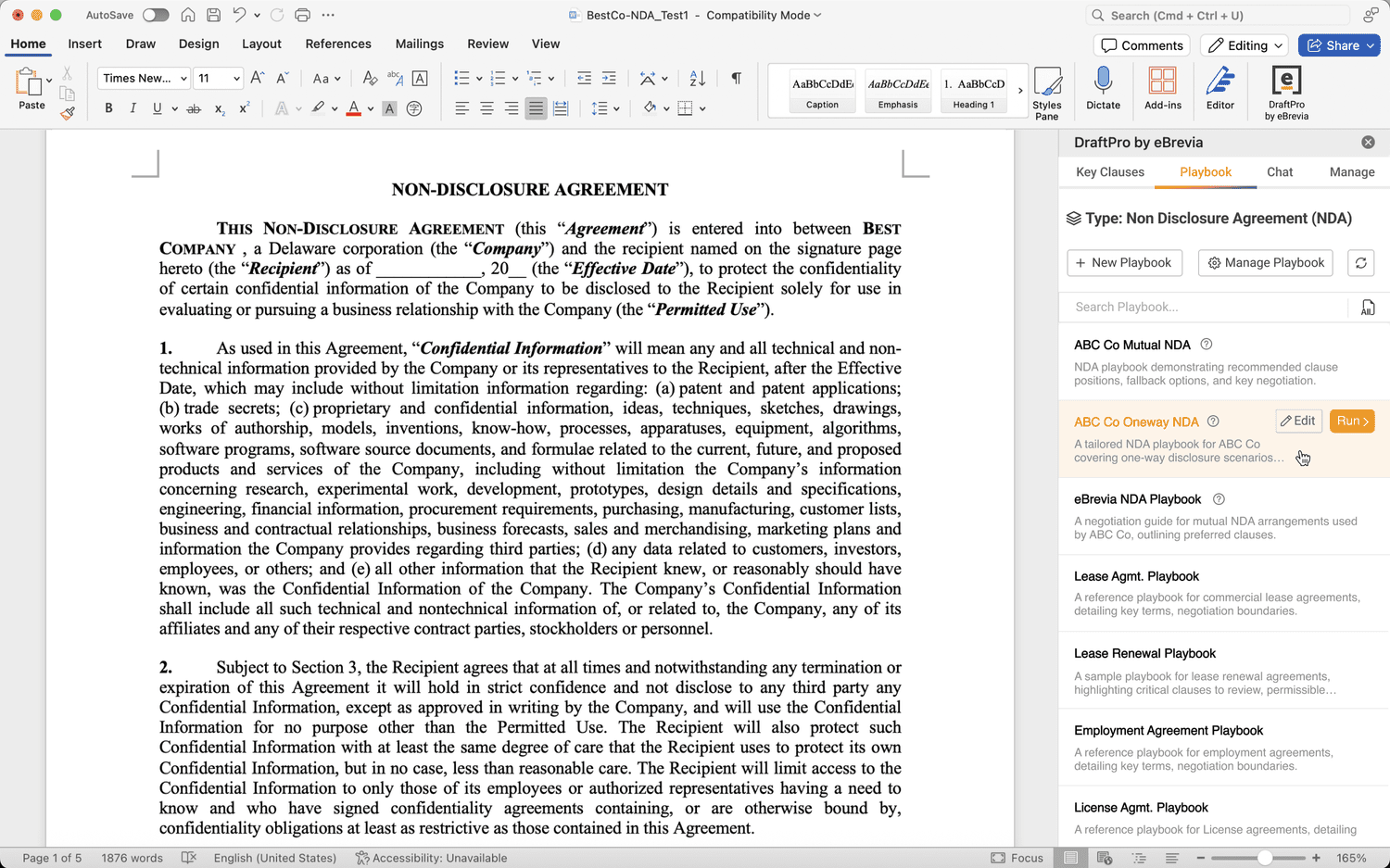
DraftPro
Draft, review and negotiate agreements directly in Microsoft Word.
Explore DraftProA Fresh Approach to Contract Management
Traditional CLM systems often try to accommodate every possible process, workflow and configuration. For many organizations, that degree of customization creates implementation, software administration and process headaches.
Command focuses on organizations’ critical needs and delivers actionable insights. It helps bring contracts together, understand the information inside them, manage active contract work and act on what requires attention.
| Capability | eBrevia Command | Traditional CLM approach |
|---|---|---|
| Contract portfolio | Centralized in eBrevia Hub | Centralized repository |
| Contract intelligence | AI-powered analysis across the portfolio | Varies by platform |
| Contract data | Extract and structure critical business information | Varies by platform |
| Contract work | Manage requests, ownership, priorities and status | Workflow management |
| Approach | Focused on practical contract work and intelligence | Often built around configurable processes |
| Implementation | Designed for rapid adoption | Can require significant configuration and process design |
Three Ways Organizations Can Use Command
Replace a CLM That Is Not Working
Move away from a system that is expensive, cumbersome, difficult to maintain or poorly adopted.
Explore a CLM alternativeIntroduce Contract Management Without Traditional CLM
Bring contracts and contract work into one place without undertaking a large CLM implementation.
See how Command worksAdd Contract Intelligence to Your Existing Environment
Use eBrevia’s AI-powered contract intelligence alongside existing technology when replacement is not the goal.
Talk to our team
Frequently Asked Questions
Answers about eBrevia Command, eBrevia Hub and how Command fits alongside the tools you already use.
What is eBrevia Command?
eBrevia Command brings your contract portfolio, the business information inside your agreements and the contract work that follows into one place. Teams can centralize contracts, surface critical information and manage active work without the friction of a traditional CLM.
What is eBrevia Hub?
eBrevia Hub is the intelligent repository at the center of Command. It centralizes your contract portfolio and makes the information inside it searchable and usable at scale, so teams can search agreements, extract contract data, analyze terms, summarize information and monitor what matters.
Is eBrevia Hub a separate product?
No. eBrevia Hub is part of eBrevia Command. It is where your contracts and the information extracted from them live, and it powers the search, analysis and contract work that Command provides.
What information can eBrevia extract from contracts?
eBrevia’s AI extracts and structures clauses, commercial terms, obligations, renewal dates, pricing, rights, risks and other contract data your organization needs, so teams can search, compare and use it across the portfolio.
Is eBrevia Command only for legal teams?
No. Legal teams use Command to manage contract work, and the same information helps procurement, sales, finance and operations teams find terms, track renewals and act on obligations across the business.
How does Command help legal teams?
Command gives legal teams one place to organize contract requests, see where each agreement stands, clarify who owns what and keep a record of activity, while AI-powered contract intelligence answers questions across the portfolio instead of one agreement at a time.
Can eBrevia Command replace a CLM?
Yes, for many organizations. Command is a practical alternative to a CLM that is expensive, cumbersome, difficult to maintain or poorly adopted, focused on the contract work and intelligence teams actually need.
Do we need a CLM to use Command?
No. Command can be your contract management system, or it can add AI-powered contract intelligence alongside the technology you already use when replacing a system is not the goal.
How quickly can eBrevia Command be implemented?
Command is designed for rapid adoption. Many organizations can get started in as little as 7 days, without lengthy implementation, extensive customization or major process redesign.
Does eBrevia Command work with DraftPro?
Yes. Command and DraftPro work together: Command manages your contract portfolio and contract work, and DraftPro lets teams draft, review and negotiate agreements directly in Microsoft Word.
Take Command of Your Contracts in as Little as 7 Days
A massive software transformation is not necessary to understand what’s in your organization’s contracts and identify what requires attention. Command is designed for rapid adoption without lengthy implementation, extensive customization or major process redesign.
- Step 1
Bring contracts together
Centralize your agreements in one accessible place.
- Step 2
Structure information
Extract and organize the key information in your contracts.
- Step 3
Set up contract work
Organize requests, responsibilities and the next steps.
- Step 4
Start acting
Help teams see what matters and move work forward.