

Master Service Agreement Drafting and Surgical Redlining with DraftPro
Draft, Redline, and Negotiate MSAs in Microsoft Word
Master Service Agreements set the rules for long-term business relationships. They define services, responsibilities, payment terms, support obligations, risk allocation, liability limits, termination rights, and negotiation positions.
DraftPro helps legal teams work through MSAs directly in Microsoft Word. Legal reviewers can run playbooks, check key terms, review suggested changes, find trusted clause language, and apply surgical redlines without moving the agreement into another tool.
With DraftPro, legal teams can move from MSA drafting to revision to counterparty negotiation in one familiar workflow.
What DraftPro Does for Master Service Agreements (MSA)?
-
DraftPro lets legal teams apply MSA playbooks directly inside Microsoft Word. The playbook helps reviewers compare the draft against approved legal and business standards. DraftPro then shows which terms pass, which terms fail, and which terms need attention.
This helps reviewers focus on the issues that matter most before the agreement moves to the next negotiation round.
-
When an MSA provision does not match the playbook, DraftPro can suggest revised language. The reviewer can read the suggestion, decide whether it makes sense, and apply the change as a redline in Microsoft Word.
This workflow helps legal teams revise common MSA provisions more consistently, including service obligations, support terms, warranties, indemnity, liability caps, termination rights, renewal language, and confidentiality obligations.
-
DraftPro helps reviewers search clause language from agreements stored in eBrevia, so they can find relevant language faster.
Instead of searching old folders, email threads, or prior drafts, legal teams can look for clause language by contract type, matter, project, jurisdiction, or specific wording. Reviewers can then use that language to replace non-standard provisions, insert missing language, or revise negotiated terms.
This helps legal teams respond to counterparty paper with language that better reflects the company’s approved positions.
-
DraftPro supports that real-world workflow. A reviewer can open the MSA in Microsoft Word, run the relevant playbook, review the results, make targeted revisions, and send back a redlined draft.
This helps legal teams handle MSAs with more consistency while keeping the negotiation process practical and lawyer-led.

Key MSA Terms DraftPro Can Help Review and Revise
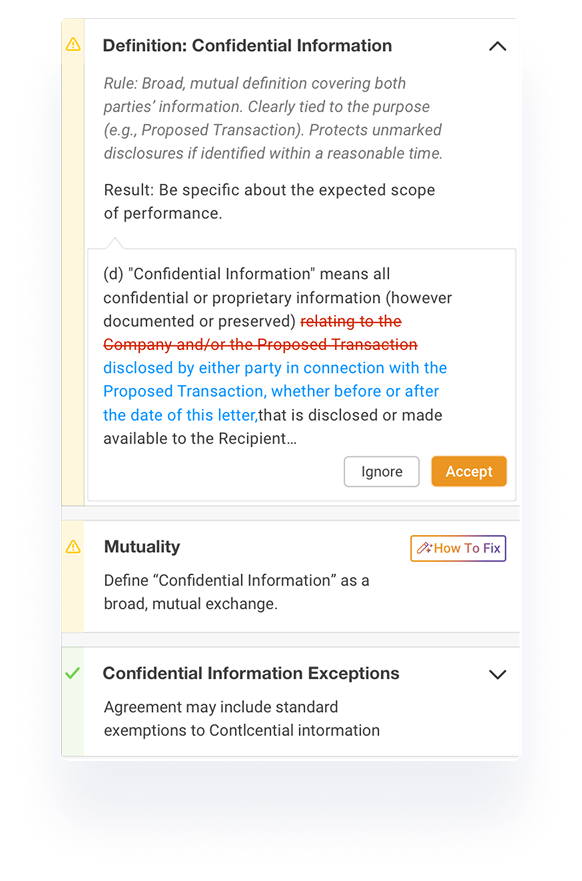
DraftPro can help legal teams work through common MSA terms, including: scope of services, statement of work structure, fees and payment terms, support and maintenance obligations, service levels, confidentiality, data handling, warranties, indemnity, limitation of liability, term and renewal, termination rights, assignment, governing law, dispute resolution.
These terms often determine how much risk the company accepts, how the service relationship operates, and how difficult the agreement may become to manage after signature.
Explore how you can draft and surgically redline Vendor Agreements, NDAs and Employment Agreements in DraftPro.
Work Directly in Microsoft Word - Where MSA Drafting Already Happens
DraftPro works as a Microsoft Word add-in. Legal teams can run playbooks, review terms, navigate the agreement, evaluate suggested edits, and apply redlines inside Word.
This gives lawyers a familiar drafting environment while adding structure to MSA review, revision, and negotiation.
Why Legal Teams Use DraftPro for MSAs?
Legal teams use DraftPro when they want to make MSA drafting and negotiation more consistent. DraftPro helps reviewers apply approved standards, reuse trusted language, and prepare targeted redlines faster.
DraftPro does not replace legal judgment. It gives lawyers better support inside the contract workflow, so they can make clearer, more consistent drafting decisions.

Surgically Redline MSAs With More Consistency
See how DraftPro helps legal teams apply MSA playbooks, find trusted clause language, and prepare redlined edits directly in Microsoft Word.
-
A Master Service Agreement, or MSA, is a contract that sets the main legal and business terms for an ongoing service relationship. MSAs often cover services, payment, confidentiality, warranties, indemnity, limitation of liability, support obligations, termination, governing law, and dispute resolution.
-
DraftPro helps legal teams draft, review, revise, and redline MSAs directly in Microsoft Word. Legal teams can run MSA playbooks, check key provisions, review suggested revisions, and apply selected edits as Word redlines.
-
Yes. DraftPro helps legal teams work with third-party MSAs from customers, vendors, partners, and service providers. Reviewers can compare the draft against internal standards and prepare targeted revisions for negotiation.
-
Yes. When MSA language does not match the playbook, DraftPro can suggest revised language. The reviewer decides whether to accept, reject, or adjust the suggestion before applying it as a redline in Word.
-
Yes. DraftPro includes sample playbooks for selected common agreement types, including Master Service Agreements. Legal teams can also create, edit, duplicate, and publish their own playbooks for organization-specific standards.
-
No. DraftPro also helps legal teams revise negotiated drafts and third-party paper. It supports the process of checking the agreement, applying playbook guidance, finding trusted language, and preparing redlines for counterparty review.